


Smart Receipts: Expenses & Tax
4.52.50K Reviews
App Specs
- Version
- Varies with Device
- Updated On
- License
- Free
- Downloads
- 1,000,000+
- Developer
- REACTIVE APPS CORP.
- Categories
- Business
- Platform
- Android
Screenshots
 Analysis by AppCompare
Have you ever found yourself drowning in a sea of receipts, desperately trying to make sense of your expenses? Well, I’ve been there, and let me tell you, it’s not fun. I decided to give Smart Receipts: Expenses & Tax a try, and honestly, it was a game-changer. Let me walk you through my experience with this nifty app.
Who gets the most from a receipt tracker
I’d look at this as a practical tool for people who need to turn loose slips into records they can sort and review later. A freelancer who buys supplies on the way to a client meeting, for example, can keep those purchases with work expenses instead of hoping to reconstruct them at tax time. Someone sharing household costs could also use a consistent routine to see where money went. It is less compelling if you only have a few receipts a month and already find a paper envelope or a basic notes app easy to maintain.
Smart Receipts is a free business app from REACTIVE APPS CORP., with optional in-app purchases ranging from $2.99 to $99.99 per item. It has an average rating of 4.5 from around 9,800 ratings, with roughly 2,500 written reviews and over 1 million installs. It is rated for everyone and has been around since October 11, 2011. Those figures suggest a well-established choice, but they don’t tell me whether its particular workflow suits you; that depends on how often you record expenses and how much detail you need.
Getting Started with Ease
First things first, Smart Receipts: Expenses & Tax is a breeze to install and set up. Available on both Android and iOS, the app guides you through the initial setup with a user-friendly interface. I was pleasantly surprised by how quickly I was able to get everything up and running. The app doesn’t bombard you with ads, which is a major plus.
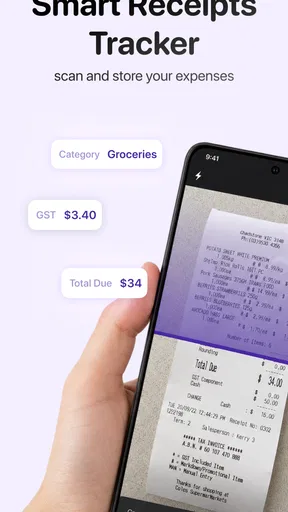
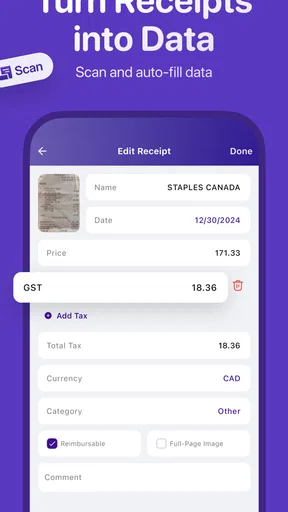
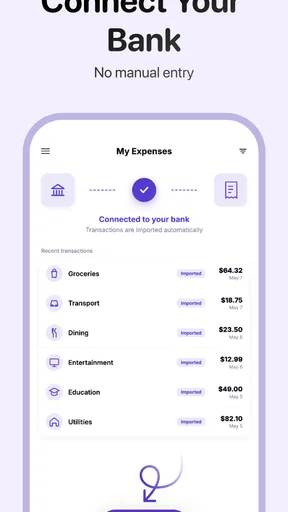
Once you’ve got the app installed, you can start by snapping pictures of your receipts. The app’s OCR (Optical Character Recognition) technology is pretty impressive. It accurately captures the details from your receipts, saving you a ton of time. No more manual data entry—hallelujah!
Features That Make Life Easier
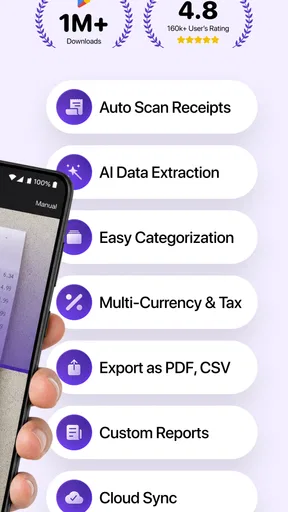
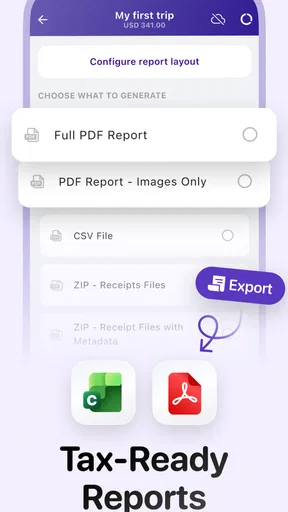
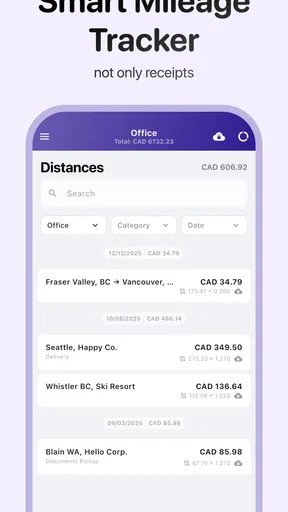
So, what makes this app stand out? For starters, it offers a range of features that cater to both personal and business needs. You can categorize your expenses, track mileage, and even generate reports for tax season. This is especially handy for freelancers or small business owners who need to keep a close eye on their finances.
The app also supports multiple currencies, which is great if you’re a frequent traveler. It automatically converts the currency based on your location. I found this particularly helpful when I was traveling abroad for a conference. No more fumbling with currency converters!
Worth Reading Before You Choose

EA SPORTS FC Mobile 26 Is a Bigger Football Game, but It Takes Time

Flipboard Shows What News Apps Must Do Beyond the Feed

Switching to Android Auto Means Rethinking Your Driving Routine

Google Calendar Makes a Crowded Week Easier to Manage

Ludo King Makes the Most of the Minutes Between Plans

Baby Panda World Brings Quick Play to Modern Phones, but Its Game Library Feels Busy
A routine that keeps receipts useful
The strongest practical benefit is not simply taking a picture; it is building a habit while the purchase is still fresh in your mind. I’d capture a receipt soon after paying, check that the important details are legible, and assign it to a sensible expense category. Leaving this until the end of the month can turn a quick task into a guessing game, especially when several purchases look alike.
For a realistic workday, imagine buying lunch during a client trip, paying for a train ticket, and picking up a small supply item before heading home. Recording each purchase as it happens gives you a better chance of remembering which costs belong to the trip and which were personal. Mileage tracking can fit into the same broader routine, but I would still review entries rather than assume that a record is automatically ready for reimbursement or tax filing.
Receipt recognition is a time-saver, not a reason to stop checking. Faded thermal paper, creases, shadows, and crowded layouts can make a scan harder to read. My useful rule is to glance over the extracted information immediately and correct anything that looks wrong while the receipt is in hand. A clear photo and a quick review are usually less effort than trying to identify a mystery charge weeks later.
User Experience and Design
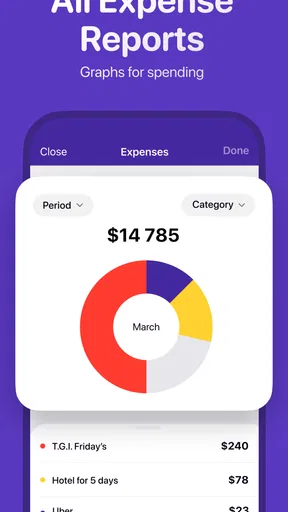
The design of the app is sleek and intuitive. Everything is neatly organized, making it easy to navigate. The dashboard gives you a quick overview of your expenses, and you can drill down into categories for more details. The color scheme is easy on the eyes, and the app’s performance is smooth—no annoying lags or crashes.
Another feature I appreciated was the ability to sync data across devices. Whether I was on my phone or tablet, my information was always up-to-date. The cloud backup feature ensures that you won’t lose your data, even if you switch devices.
Readable screens, different ways of using the app
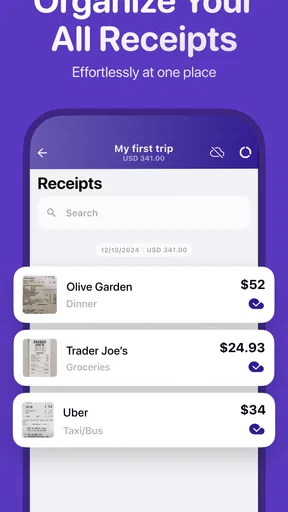
For me, the dashboard’s overview is useful because it gives a starting point rather than requiring me to inspect every expense one by one. Categories also make a difference: a clear naming scheme helps when I return to an older report and need to distinguish travel costs from everyday spending. I’d keep category names familiar and specific enough to mean something later, rather than creating a long list of near-duplicates that makes filing slower.
Using a phone to photograph a receipt is convenient when the paper is small and the setting is calm. It can be more awkward on a crowded train, in poor light, or when a receipt is long and needs to be positioned carefully. If a scan matters for an employer or tax record, I’d take a moment to flatten the paper and frame the whole receipt instead of trying to capture it in a hurry.
People who find small touch targets, screen glare, or dense screens tiring may prefer to do the review and categorization later, somewhere comfortable, rather than complete every step at the point of purchase. Syncing across devices can be helpful for that split routine: capture on the go, then review on a larger screen. That flexibility is a practical advantage, though it still depends on the app fitting the user’s own device and preferences.
Where it differs from simpler alternatives
A spreadsheet or notes app can be a perfectly reasonable alternative if you only need a short list of purchases and are happy to type everything yourself. A folder of receipt photos is even simpler, but it leaves you to search and organize the images later. Smart Receipts brings receipt capture together with categories, mileage tracking, and reports, so it makes more sense when you need a repeatable expense record rather than an occasional reminder.
The trade-off is that a purpose-built tracker asks you to adopt its workflow. If you want to control every column and formula, a spreadsheet may feel more adaptable. If you need formal bookkeeping across a business, expense capture alone may not replace the accounting system you rely on. I see this app as a way to organize supporting expense information, not as a substitute for checking the rules that apply to a reimbursement claim or tax return.
Security You Can Trust
With all the sensitive financial data involved, security is a big concern. The app uses strong encryption to protect your data, and you can set up a PIN or biometric lock for added security. I felt confident knowing that my information was safe and secure.
Even with those protections, I’d treat expense records as private and take care about where I open them, particularly on a shared device. A PIN or biometric lock can reduce casual access, but it is still sensible to use a device lock and avoid leaving financial details visible to people nearby. For anyone managing work receipts, it is also worth deciding in advance which device they want to use and keeping their record-keeping routine consistent.
Customer Support and Community
In case you run into any issues, the app offers robust customer support. I reached out with a question about report generation, and the response was prompt and helpful. There’s also a community forum where you can connect with other users and share tips and tricks.
For those who love exploring, the app offers a detailed FAQ section and tutorial videos to help you make the most of its features. It’s like having a personal assistant for your finances.
Limits worth considering before you commit
The main friction is the attention a good expense record still requires. Automated recognition can reduce typing, but it cannot decide whether a purchase is personal or work-related for you, and a report is only as useful as the entries behind it. If you tend to let receipts pile up, the app may help you catch up, but it cannot make delayed sorting effortless. A short, regular review is the more dependable approach.
It is also worth thinking about cost before relying on paid capabilities. The app is free to download, while optional purchases are available at different prices. I would start with the basic workflow and see whether scanning, categorizing, mileage, and reporting address the problem you actually have before paying for anything. If you only need to photograph receipts occasionally, an existing camera and a simple folder could be enough.
For travelers, the multiple-currency support can reduce the mental arithmetic involved in reviewing spending after a trip. Still, I’d preserve the original receipt and check the recorded amount and currency, especially when converting expenses or preparing a reimbursement. That small verification step matters more than trusting any single automated process.
Final Thoughts
All in all, Smart Receipts: Expenses & Tax is a solid choice for anyone looking to simplify their expense tracking. Whether you’re a business professional or someone just trying to keep their budget in check, this app has something to offer. It’s user-friendly, feature-rich, and secure—a trifecta that’s hard to beat.
If you’re tired of the chaos that comes with managing receipts and expenses, give this app a try. It’s like having a financial wizard in your pocket, ready to help you make sense of it all. Happy budgeting!
My inclusive verdict
I’d recommend it most to people who regularly collect receipts, travel for work, track mileage, or need categorized records for later reporting. Its combination of photo capture and expense organization can make an otherwise scattered task easier to manage. It may be less suitable for anyone who finds phone-based entry uncomfortable, wants a completely customizable spreadsheet, or needs a full accounting suite rather than receipt tracking.
Different people will use it in different settings: someone with time to review entries at a desk may find the workflow straightforward, while someone trying to scan paper quickly in a noisy, dim, or crowded place may run into more friction. My advice is to try a few ordinary purchases first, check the recognized details, and see whether the screens and routine feel manageable on your device. If the habit fits, Smart Receipts can give receipts a useful place in your financial routine without pretending that automation removes the need for judgment.
Pros
- Easy to navigate interface for quick access.
- Customizable categories for detailed tracking.
- Exports reports in multiple formats.
- Supports multiple currencies for global use.
- Integrates with cloud services for data backup.
Cons
- Free version has limited features.
- Initial setup can be time-consuming.
- Occasional sync issues reported.
- Ads in free version can be distracting.
- Limited customer support options.
FAQs for Smart Receipts: Expenses & Tax
What features does Smart Receipts offer for managing expenses?
Smart Receipts provides a comprehensive suite of features for expense management. Users can easily snap photos of receipts, categorize expenses, and generate detailed reports. The app supports multiple currencies and integrates with cloud storage for seamless data backup. Additionally, users can export data in various formats, including PDF and CSV, making it ideal for personal or professional use.
Is Smart Receipts secure for storing sensitive financial data?
Yes, Smart Receipts prioritizes user security by implementing robust data protection measures. It uses encryption to safeguard your financial information, ensuring that your data is secure on your device. The app also allows users to set up password protection, adding an extra layer of security to prevent unauthorized access to sensitive information.
Can I use Smart Receipts across multiple devices?
Smart Receipts supports cross-device usage by allowing users to sync their data through cloud services like Google Drive. This means you can access your expenses and receipts from any device, whether Android or iOS, as long as you're logged into the same account. This feature ensures flexibility and convenience for users who switch between devices.
How does Smart Receipts help with tax preparation?
Smart Receipts simplifies tax preparation by enabling users to categorize expenses according to tax brackets. The app generates comprehensive reports that highlight deductible expenses, making it easier to organize and submit tax returns. By keeping all financial documents in one place, it reduces the hassle and time spent during tax season.
Is there a cost associated with using Smart Receipts?
Smart Receipts offers both a free version and a premium version with additional features. The free version is ad-supported but includes essential functionalities like receipt scanning and report generation. The premium version, available via in-app purchases, removes ads and unlocks advanced features such as multi-language support and custom report templates.


